GUIs GUIs Site News Site News Xerox Xerox Visi On Visi On GEM GEM Deskmate Deskmate GEOS GEOS Desqview/X Desqview/X AmigaOS AmigaOS RISC OS RISC OS BeOS BeOS QNX QNX OS/2 OS/2 Apple Apple Linux/Unix Linux/Unix Windows Windows Win Shells Win Shells Misc GUIs Misc GUIs GUI Timeline GUI Timeline GUI Sites GUI Sites
|
Location: GUIs >
Windows >
Windows 3.11 Screen Shots
This might be a little confusing, but there were actually 4 releases
of Windows 3.1x:
In order for Windows 3.1 to use networking, a DOS NIC driver, protocol, and client software had to be provided. As networking software became extremely feature rich, the size of the client software resident in the real-mode (640k) portion of RAM grew to to the point that many applications would not run due insufficient free real-mode RAM. Windows For Workgroups solves this problem by adding protected mode network support. Rather than loading drivers in to the 640K segment, the Microsoft Windows Network software loads in the form of ".386" files (AKA VxD files). The downside to this is that when you exit to DOS, all networking support disappears.
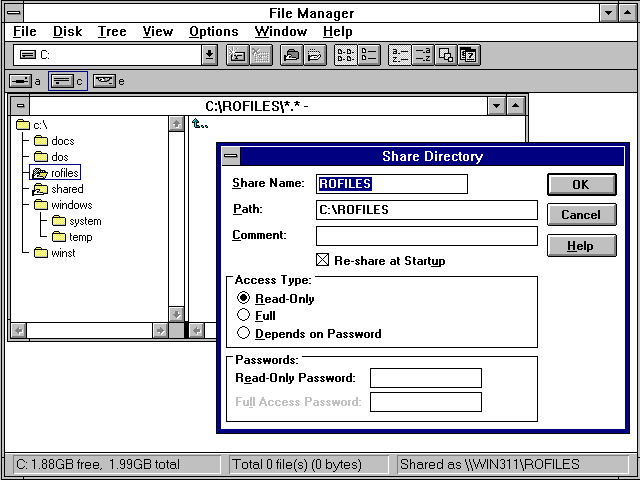
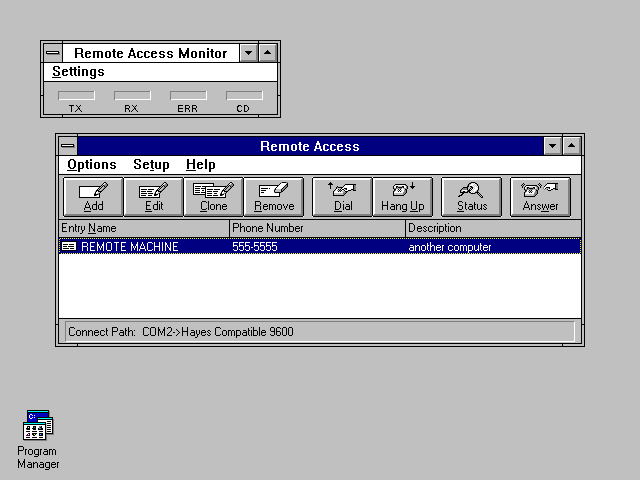
The first option is the type of network that is being used. This allows you to select support for third party DOS based networking system (they can not be used at the same time as the Windows Network), but in this case the Windows Network is selected, enabling the other options. The second option allows you to share files and printers with other users on the network In other words, it can act as a print or file SERVER. This is something that is rarely seen in DOS based networking systems, and traditionally costs megabucks in server licenses. The sharing dialog is open in this picture. The last option is a list of network drivers and protocols. This may include a network card and/or Remote Access Server dial-up. Windows for Workgroups includes the NetBeui and IPX/SPX protocols. TCP/IP is available separately. RAS in Windows 3.11 is limited to the NetBeui protocol.
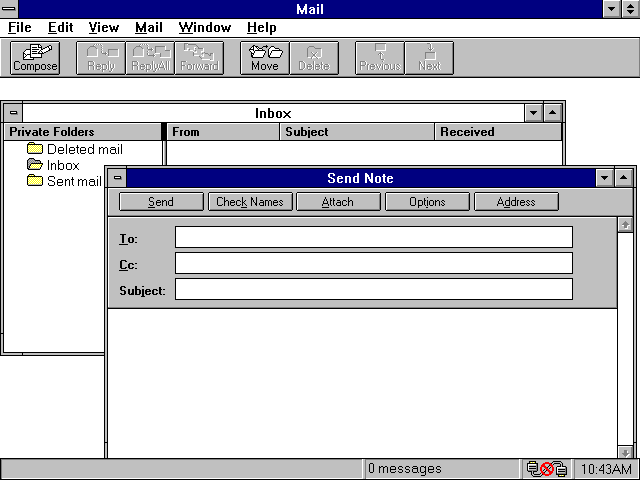
One of these applications is Microsoft Mail. It connects to a "PostOffice", which is a simple file share on a remote computer with user accounts and mail folders, and users can send and receive messages to and from other users in this Post Office.
|